Be discovered
A company page with your offer, materials and a stand QR, live before the doors open.
 Shake-on
Give your booth a presence before the doors open. Find relevant attendees, capture the conversation, and follow up with context.
Already exhibiting? Open Shake-on ↗
 Your booth. Your team.Ready for the next conversation.
Remote monitoring that fits the way care teams work.
A guest is pointed to your stand for a reason, your team scans her badge, and the lead arrives with her need, her consent and a follow-up draft.
Follow one opportunity from an exhibitor profile to a relevant conversation and a useful next step.
THE EXHIBITOR JOURNEYIllustrative product flowA company profile with an offer, useful materials and a clear next step. Ready for people to discover before they reach your stand.
Remote monitoring that fits the way care teams work.
Your event goals and offer connect with what an attendee is looking for. See the reason for the match, then arrange a meeting.
Why this introduction?She is looking for what your team offers.
Scan an attendee’s ticket QR. Add a note and your team’s rating while the conversation is fresh. The lead keeps its follow-up consent status.
Marieke de RuiterMedtech ExchangeExploring a pilot with two care teams. Share the implementation overview.
See the activity behind a lead’s priority. Use your notes for a relevant follow-up, with CSV export and HubSpot available to the booth owner.
Hi Marieke,
Good to hear about your plans for the two care teams. Here’s the implementation overview we discussed.
Your booth, in your hands.Your organizer invites your booth owner. From there, make the page your own with your story, product media, brochures and event offers.
People can explore your offer, save your booth and request a meeting in the event experience.
Shake’s short conversation turns your goals, offer and ideal visitor into an event intent summary you can review and edit.
That context helps rank attendees who fit what you’re looking for. Their event-specific needs shape the recommendation too.
Explore how matching works ↗Invite colleagues by email. They bring their own Shake-on profile into the team and get the tools to capture leads at the event.

Their name, title and photo appear on the public booth page only when they opt in.
Booth ownerManage the profile, team, leads and meetings, with owner tools for export and CRM.
Booth staffUse a personal profile, scan attendee tickets, add notes and rate leads in the booth workspace.
A booth QR helps attendees find you. A ticket scan helps your team remember them.
Her interest is recorded.
Your company stays on her radar.
Put the booth QR on your stand or share the link. Visitors can open your company page, explore materials and save your booth.
Registered guest activity adds context to the lead, including booth-page visits and document downloads.
Marieke’s ticketMedtech ExchangeShare the implementation overview.
★★★★★Use your phone camera to capture an attendee’s ticket QR. Add a quick note and a star rating before the details fade.
For a new scanned lead, follow-up waits for consent unless the attendee has already saved your booth.
Match fit helps you decide who to meet. Lead priority helps you decide where to follow up, using recorded engagement and your team’s judgment.
Recorded booth activity+15
Saved your booth+20
Team rating: 4 out of 5+4
Saving your booth or a strong team rating can lift the label to Warm, even when the number is below 40.Exploring a pilot with two care teams. Share the implementation overview.
The conversation continues.Remote monitoring pilot.
Two care teams.
A useful introduction.
A useful message starts with what you learned, what they asked for, and the next step you discussed.
Your leads keep the activity, notes, ratings and follow-up history that make the next conversation relevant.
Draft a follow-up, review it and send when consent allows. Booth owners can export a CSV or connect HubSpot to move the work into their sales process.
Explore follow-up and next steps ↗Revenue comes from what happens next. Shake-on gives your team the event context to work with.
Invite their booth owners, help relevant people find each other and give teams a practical way to work on the opportunities your event creates.
Explore trade shows & expos ↗Let’s make this part of your exhibitor experience.
Already invited to a booth? Sign in to Shake-on ↗The same four steps for every exhibitor, whether you bring two people or twenty.
A company page with your offer, materials and a stand QR, live before the doors open.
Tell the Concierge who you came to meet. Shake-on ranks the visitors who need what you offer, and shows why.
Scan a ticket, add a note and a rating while the conversation is fresh. Consent stays attached.
Review a follow-up draft, then export a CSV or send leads to your own HubSpot.
Your event recapMedTech Europe
Illustrative product example
A short conversation with the Concierge turns your goals, your offer and your ideal visitor into a summary you review and edit. Shake-on uses it to rank visitors who fit, alongside what they said they need at this event.
Profile, categories and stand location. Images, video, downloads and offers. Contact details and a shareable stand QR.
Every recommended visitor comes with the reason: what they need and how it matches what you offer.
Visitors can request a meeting from your page, and you can invite the ones that fit.

Invite colleagues by email. They bring their own Shake-on profile and get the tools to capture leads. A colleague's email is enough.
Put the QR on your stand or share the link. Visitors open your company page, browse your materials and save your stand. Their activity adds context to the lead, including page visits and downloads.
Use the phone camera to scan a visitor's ticket QR. Add a quick note and a rating before the details fade. For a new lead, follow-up waits for consent, unless the visitor already saved your stand.
Leads · Stand B14NordReg AdvisorySupport entering the Nordic market
“Share the Nordic guide.” ★★★★☆
Follow-up consent recordedIllustrative product example
Two separate signals, so you can see what's behind each one. Match fit helps you decide who to meet. Lead priority helps you decide who to follow up first.
Your offer and goals alongside a visitor's needs and profile.
Stand activity, interest they expressed, follow-up consent and your team's own rating, each shown with its weight.
A strong team rating or a saved stand can lift a lead to warm, even when the score is low.

Your leads keep the activity, notes, ratings and consent that make the next conversation relevant. Draft a follow-up, review it and send when consent allows. Or move the work into your own sales process.
Revenue comes from what happens next. Shake-on gives your team the context to work with.
Hi Marieke,
Good to meet you at stand B14. As promised, here's our Nordic market-entry guide. With your two devices launching in Q1, the registration timeline on page 4 is the part to look at first.
Shall we set up a call next week?
Your matchesMedTech Europe
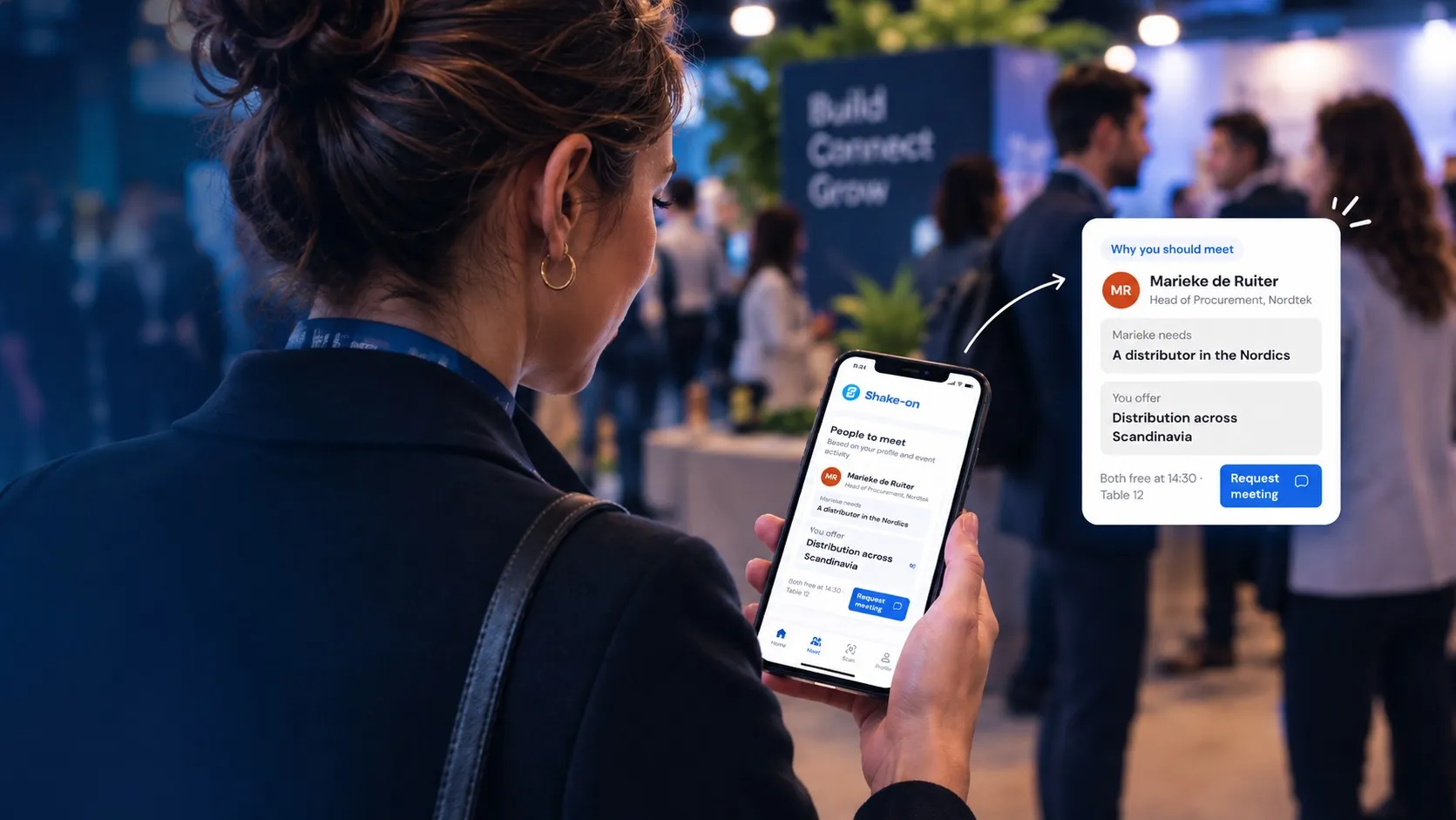
You need a Nordic distributor. Jonas distributes diagnostics to hospitals across Scandinavia and is looking for new suppliers.
Illustrative product example
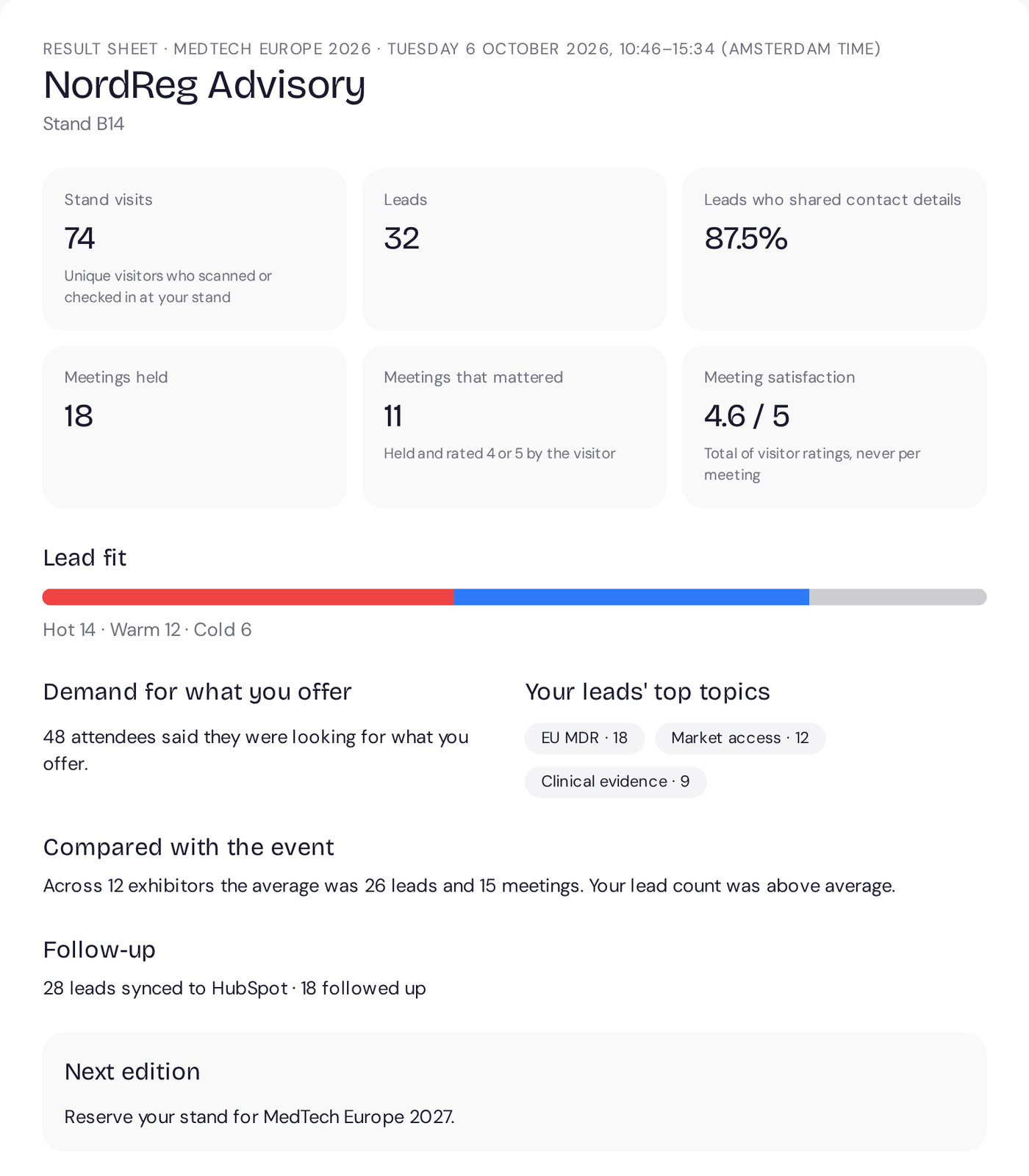
When the organiser runs Shake-on on Professional or Signature, your team gets a results sheet the day after the event. Ready for whoever signs off the stand budget.
Stand visits, leads with their fit and how many agreed to follow-up, meetings held, meetings that mattered and your total meeting score.
An anonymous comparison with the event average, when at least 5 exhibitors take part.
The day after, your team rates lead quality and value for money, and says whether you would exhibit again.
A private link that works without logging in, plus a PDF to pass on.
Results sheet · NordReg AdvisoryStand B14Illustrative product example
Invite booth owners, help the right visitors find them and give every team a practical way to work on the opportunities your event creates.
Include it in your stand packages or sell it on. With Professional.

No. Booth staff scan visitors' ticket QR codes with the camera on their own phones, in the browser. There is nothing to install.
As many as you need. Booth staff are unlimited, and a colleague’s email address is enough to invite them.
When the visitor has opted in, yes. Each lead records whether they agreed to hear from you. For a new scanned lead, follow-up waits for consent unless they already saved your stand.
They stay in your booth workspace with notes, ratings and activity. The booth owner can export them as a CSV or send them to your own HubSpot.
No. Notes and ratings are for your team. Visitors see your public company page and the people who chose to appear on it.
Only as a total for your stand, once at least 5 people have answered. Nobody sees another person’s individual rating.
That depends on your organiser. The exhibitor tools come with their Professional or Signature plan, so ask what is included in your stand package.
Registration is a conversation
Looking for
Offers
Marieke needs a Nordic distributor
Jonas distributes across Scandinavia
Why you should meet
You need a Nordic distributor. Jonas distributes diagnostics to hospitals across Scandinavia and is looking for new suppliers.
Request meetingMarieke de Ruiter, Jonas LindqvistDay 1 · MedTech Europe
14:20
Shake-onnowRecommended stand
They take medical devices through Nordic registration. That matches your Q1 launch.
Show me the way Rasmus · NordReg Advisory
MedTech Europe 2026
Follow-up draft AI
MedTech Europe 2026 · ResultsMeetings per hour
Where demand beat supply
Invite more distributors next edition.
MedTech Europe 2026 · Exhibitor performanceShake-on · Your event recapShake-on · reading event dataWorking…Sent reminders to 184 registrants who haven't confirmed.
Working…Offered 13:15 meeting slots to 138 guests with open matches.
Working…Send a follow-up to 57 no-shows.