CSV from any system
Map the columns once. Import again whenever the list changes: guests are matched on email, so nobody is invited twice.
 Shake-on
Bring guests in from any ticketing system. Send leads to your CRM, meetings to calendars and ticket revenue to your own Stripe account. Everything else leaves as a CSV, whenever you want it.
One place in the middle, with clear doors on both sides.
Sell tickets wherever you like. Shake-on takes the guest list from there and brings everyone into the Concierge.
Map the columns once. Import again whenever the list changes: guests are matched on email, so nobody is invited twice.
Each guest gets an email with one button that signs them in and starts the Concierge. No password, and their ticket stays valid.
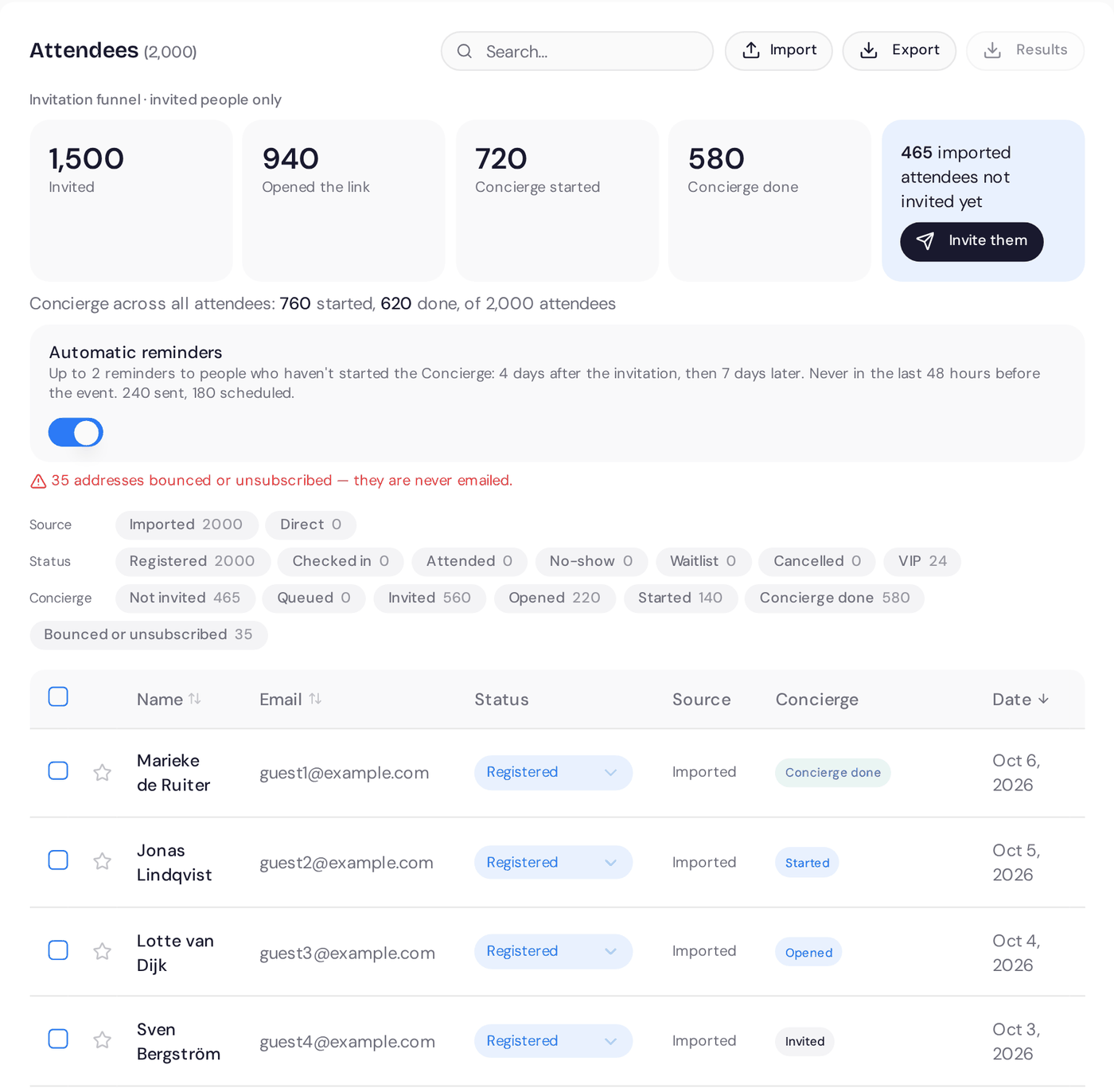
See who was invited, who opened the link and who finished the Concierge. Invite everyone who hasn’t been invited yet in one go. Bounced and unsubscribed addresses are skipped.
An old link opens a page where the guest can email themselves a new one. Sending a new link switches off the old one.
MedTech Europe 2026Attendees| Marieke de Ruiter | Imported | Concierge done |
| Jonas Lindqvist | Imported | Opened |
| Anna Nieminen | Imported | Not invited |
Illustrative product example
Booth owners connect their own HubSpot and send leads with the visitor's goals, stand activity, the team's note and consent status. Not a bare name and email.
Paid tickets are paid into your own Stripe account. Card payments are handled by Stripe. Shake-on charges 1.9% per ticket, capped at €7.
Both people get a calendar invite for every accepted meeting, with the time and the table. It works with Google Calendar, Outlook and Apple Calendar.
Keep your ticketing. Import attendees from any system that exports a CSV, then send each one a one-tap link to the Concierge to open up matchmaking.
Guest list export on every plan. Leads for booth owners. Guest-level results on Professional and Signature, or as an add-on to Essential.
Connect an AI assistant that supports the Model Context Protocol to the event and attendee data your account can access. Ask it questions, build a summary or prepare a follow-up list.
Confirmations, invitations, reminders and recaps are sent by Shake-on, so guests hear from your event without a separate email tool.
Venue maps use OpenStreetMap. Floor plans with stands and meeting areas are drawn in Shake-on on Professional.
Export leads as a CSV and import them with your CRM's own importer. Need a direct connection? Tell us which system, and we'll tell you what's possible.
A short email in the name of your event. It explains what the event app is for and asks for a two-minute chat with the Concierge.
The button signs the guest in. It only works for the address it was sent to.
The email says so plainly, with the date and the place, so nobody thinks they have to register again.
It says the chat is with an AI assistant, how the answers are used and where to read how data is handled. Unsubscribe is one click.
You’re registered for MedTech Europe 2026. Tell us in a 2-minute chat what you’re here for, and we’ll introduce you to the right people.
Start in the event appThe button signs you in. No password needed. It works for this email address only.
When: 14 May 2026 at 09:00
Where: Rotterdam Ahoy
Your ticket stays your entry ticket. You don’t need to register again.
Illustrative product example
Any system that exports a CSV file, which covers almost all of them. You map the columns once during import. Guests then get an email invitation to the Concierge.
Yes. Import a new file whenever your list changes. Guests are matched on their email address, so people who are already in Shake-on aren't invited twice.
Each booth owner connects their own HubSpot, so leads go to the exhibitor's CRM, not yours. Organisers see aggregate results, not an exhibitor's pipeline.
On Signature, your own AI assistant can read your event summaries through MCP, read-only. For anything else, tell us what you want to connect and we'll tell you what's possible today.
Only where you or an exhibitor send it. HubSpot receives leads only when a booth owner connects it. The full list of providers is on our subprocessors page.
See the Shake-on loop on an event like yours. Thirty minutes, with someone who has organised events.
Book a demo ↗Create an event for up to 50 guests, free, with full matchmaking.
Create your free event ↗Registration is a conversation

Looking for
Offers
Marieke needs a Nordic distributor
 Jonas distributes across Scandinavia
Why you should meet
You need a Nordic distributor. Jonas distributes diagnostics to hospitals across Scandinavia and is looking for new suppliers.
Request meetingMarieke de Ruiter, Jonas LindqvistDay 1 · MedTech Europe
14:20
Shake-onnowRecommended stand
They take medical devices through Nordic registration. That matches your Q1 launch.
Show me the way Rasmus · NordReg Advisory
MedTech Europe 2026
Follow-up draft AI
MedTech Europe 2026 · ResultsMeetings per hour
Where demand beat supply
Invite more distributors next edition.
MedTech Europe 2026 · Exhibitor performanceShake-on · Your event recapShake-on · reading event dataWorking…Sent reminders to 184 registrants who haven't confirmed.
Working…Offered 13:15 meeting slots to 138 guests with open matches.
Working…Send a follow-up to 57 no-shows.