Kick-off and goals
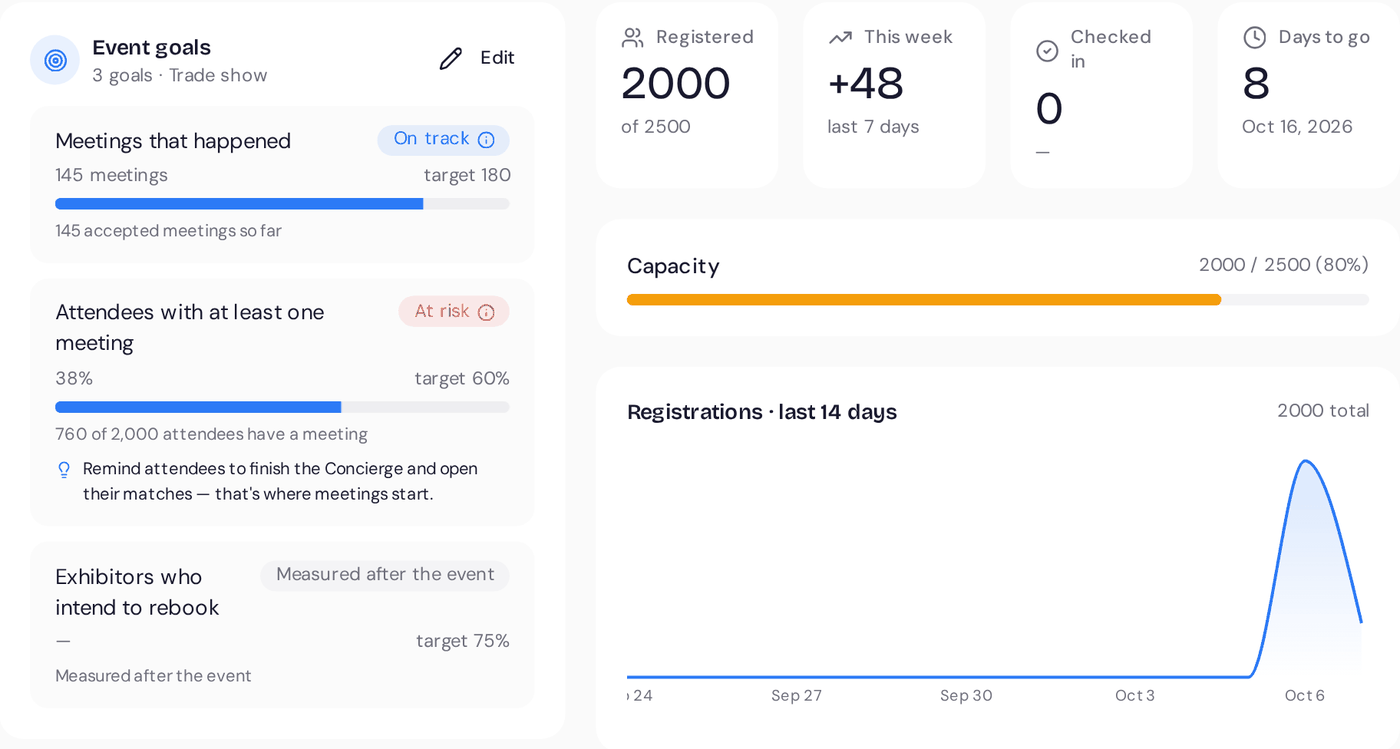
A kick-off call to walk through your event, exhibitors and timeline. You agree goals with your stakeholders and set them in Event goals: accepted meetings, leads per exhibitor, check-in rate.
 Shake-on
What happens between saying yes and the Monday after, who does what, and the support you get on the day. This is the plan for a trade show on Professional. Smaller events move faster.
A kick-off call to walk through your event, exhibitors and timeline. You agree goals with your stakeholders and set them in Event goals: accepted meetings, leads per exhibitor, check-in rate.
Build the event page right on the page, or ask the Copilot for a starter page. Add ticket types and publish. Already selling tickets elsewhere? Import your first CSV instead.
Invite booth owners. They fill in their company page, tell the Concierge who they came to meet and invite their colleagues. You can see which stands are ready.
Guests receive their introductions and meeting requests start. The floor map, meeting areas and time slots are final. A reminder goes to guests who haven't answered the Concierge.
We go through the checklist below together: check-in devices, badges, meeting areas, connectivity and who to call on the day.
Check-in, meetings and lead scanning run live, and the Copilot tells you what needs attention, such as guests still without a meeting.
Every goal next to its result, meetings that mattered, the survey the day after and a results sheet for each exhibitor. Ready to share with your board, exhibitors and sponsors.
Recaps and follow-ups are out. We look at where demand beat supply and what to change, then you duplicate the event for next year.
MedTech Europe 2026OverviewTip: 14 exhibitors haven’t told the Concierge who they came to meet.
Illustrative product example
Help centre and email support.
Onboarding and setup with our team, from kick-off to the doors opening.
Named support during your event days.
An on-site review of your setup.

Most take five minutes. All of them save you a bad first hour.
Your matchesMedTech Europe

You need a Nordic distributor. Jonas distributes diagnostics to hospitals across Scandinavia and is looking for new suppliers.
Illustrative product example
Check-in keeps working. Crew phones hold an offline copy of the guest list and sync when the connection returns. The guest app, meetings and lead scanning need a connection, so we check wifi and mobile coverage at the stands before the event.
Badges print from the browser on the check-in laptop, to a label or badge printer connected to it. Tell us the model you plan to use and we'll test a badge with you before the event.
You write your event page and emails in the language of your event. The Concierge can talk with guests in their own language. Tell us which languages your audience needs and we'll confirm what's covered for your event.
The guest app runs in any modern browser, so guests can use their own screen reader, text size and contrast settings. If your audience has specific access needs, tell us during onboarding and we'll go through them with you.
Yes, as often as you need. Guests are matched on their email address, so nobody is invited twice. Late arrivals can also register at the door.
Shake-on is built for people in the same place. Online guests can use the Concierge, introductions and messaging, but there is no video streaming or virtual stage. Pair it with your streaming platform if you need one.
Any phone with a camera works, so use as many as you have crew. As a rule of thumb, plan one device for every 300 guests arriving in the first hour.
See the Shake-on loop on an event like yours. Thirty minutes, with someone who has organised events.
Book a demo ↗Create an event for up to 50 guests, free, with full matchmaking.
Create your free event ↗Registration is a conversation
Looking for
Offers
Marieke needs a Nordic distributor
Jonas distributes across Scandinavia
Why you should meet
You need a Nordic distributor. Jonas distributes diagnostics to hospitals across Scandinavia and is looking for new suppliers.
Request meetingMarieke de Ruiter, Jonas LindqvistDay 1 · MedTech Europe
14:20
Shake-onnowRecommended stand
They take medical devices through Nordic registration. That matches your Q1 launch.
Show me the way Rasmus · NordReg Advisory
MedTech Europe 2026
Follow-up draft AI
MedTech Europe 2026 · ResultsMeetings per hour
Where demand beat supply
Invite more distributors next edition.
MedTech Europe 2026 · Exhibitor performanceShake-on · Your event recapShake-on · reading event dataWorking…Sent reminders to 184 registrants who haven't confirmed.
Working…Offered 13:15 meeting slots to 138 guests with open matches.
Working…Send a follow-up to 57 no-shows.